QR Code Menu for Restaurants: Benefits, Best Practices, and Common Mistakes
 Written by Krystian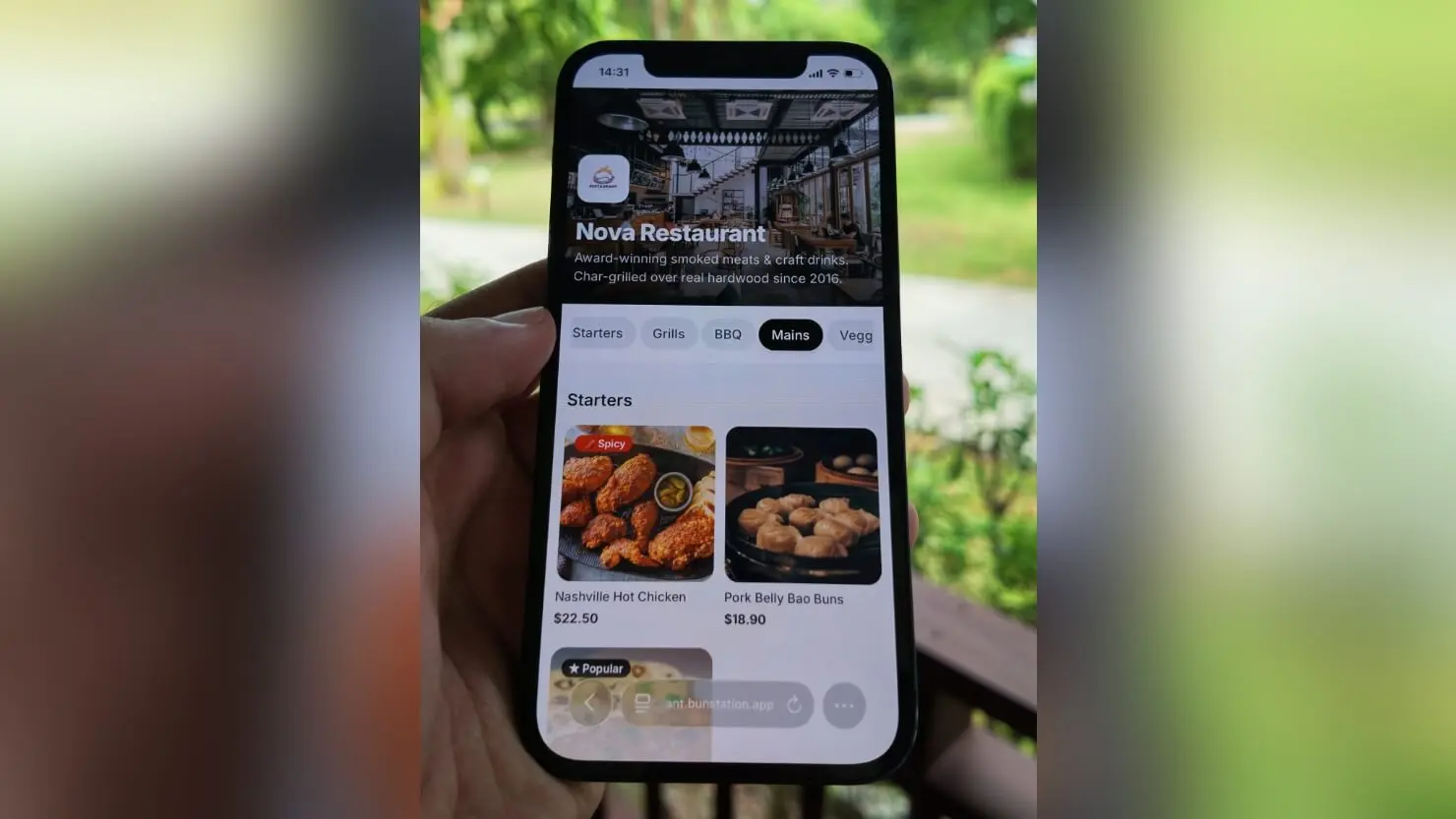
QR code menus started as a temporary fix during the pandemic. Most restaurants that adopted them never went back to paper. But a QR code pointing to a poorly built digital menu is worse than no digital menu at all. This guide covers what actually makes a digital restaurant menu work, where most restaurants go wrong, and what to look for when choosing a tool.
From temporary workaround to permanent standard
When restaurants were forced to remove physical menus, QR codes became the fastest solution. The assumption was that guests would tolerate them until things returned to normal. What happened instead is that both sides discovered real advantages that had nothing to do with hygiene.
Guests found it easier to browse at their own pace, read dishes clearly, and check allergen information without flagging down a server. Restaurants found they could change prices, remove sold-out items, and add seasonal specials without reprinting anything. The inconvenience of paper menus became obvious only once there was a working alternative. Today, a digital restaurant menu is not an experiment. It is the baseline expectation at a growing number of venues.
The real business case for going digital
Menu changes that happen in seconds
A printed menu is a fixed document. Every price increase, dish removal, or ingredient change requires a reprint. For a restaurant that adjusts its offering seasonally or weekly, this adds up quickly: in time, cost, and waste. With a digital menu, any change goes live immediately across every table in the room. No reprints, no crossed-out items, no explaining to guests that the price on the card is outdated.
Higher average order values
Research consistently shows that menus with photos lead to higher order values. A well-presented dish image does what a description alone cannot: it makes the dish feel real and desirable before the guest orders. A digital restaurant menu supports photos natively, without the design constraints of a printed card. Restaurants that add quality images to their digital menus typically see guests order more starters, desserts, and drinks: items that are easy to skip when they are just a line of text.
Less pressure on front-of-house staff
A clear, well-structured digital menu answers questions that would otherwise require a staff member. Allergen details, dish descriptions, portion sizes, and ingredient notes can all live on the menu page. When guests arrive informed, servers spend less time reciting the menu and more time on the parts of hospitality that actually require a person.
Lower ongoing costs
The cost of maintaining a printed menu is rarely calculated in full. Design fees, printing runs, lamination, replacements for damaged cards, and storage all add up over a year. A digital menu has a one-time setup effort and a predictable hosting cost. For most restaurants, the savings in printing alone offset the cost of a digital solution within a few months.
What guests actually expect from a digital menu
It has to load immediately
Guests scan a QR code with a specific expectation: the menu should open instantly. A page that takes more than two or three seconds to load creates frustration before a single dish has been read. This is particularly important because restaurant guests are often scanning while mid-conversation, in low light, on a mobile network. Speed is not a nice-to-have. It is the first test any digital restaurant menu has to pass.
A layout that makes sense on a phone
Most guests scan QR code menus on a phone, not a tablet or laptop. A menu designed as a desktop PDF converted to a link will fail this test. The layout needs to work at a small screen width: readable font sizes, clear category navigation, enough spacing between dishes to scroll without accidentally tapping the wrong item. Mobile-first design is not optional for a QR code menu.
Accurate allergen and dietary information
Guests with allergies or dietary requirements rely on menu information to make safe choices. A digital menu that includes allergen labels, vegan or vegetarian markers, and clear ingredient notes is not just better UX. It is a direct trust signal. Restaurants that mark this information clearly reduce awkward conversations, reduce the risk of mistakes, and give a segment of guests a reason to choose them over venues where this information is harder to find.
No app downloads
Asking a guest to download an app to view a menu is a significant friction point that most will simply refuse. The best digital restaurant menus open directly in the phone's browser, no sign-up, no app, no barrier. A QR code that opens a mobile-optimised web page is the format guests are most comfortable with.
Common mistakes restaurants make with QR code menus
- Linking to a PDF: PDFs are not mobile-optimised, slow to load, and impossible to update without changing the link. A dedicated menu page is always a better choice.
- Setting up once and never updating: The main advantage of a digital menu is the ability to keep it current. Restaurants that set it up once and leave it unchanged lose this benefit entirely.
- No photos: A text-only digital menu delivers little more than a printed card. Even a small number of well-chosen photos significantly improves the browsing experience.
- Poor QR code placement: A QR code that is too small, printed on a glossy surface, or placed somewhere with bad lighting will not scan reliably. Test placement before rolling it out across all tables.
- Choosing a tool with no easy editing: If updating the menu requires raising a support ticket or hiring a developer, the menu will not get updated. Choose a tool where any team member can make changes in a few minutes.
- Ignoring loading speed: A slow-loading menu page will be abandoned. Check that the tool you use generates fast, lightweight pages, not heavy frameworks that take several seconds to render.
What to look for when choosing a digital menu tool
Easy editing without technical skills
The team member updating the menu during service is usually not a web developer. The tool needs to make changes fast and obvious: log in, find the item, change the price or mark it unavailable, save. If the editing interface takes more than a few steps or requires technical knowledge, the menu will fall out of date.
Mobile-first output from day one
Some tools let you build a menu that looks great on a desktop and only reveal the mobile problems after launch. Look for tools that generate mobile-optimised pages automatically, with no separate configuration needed. Ideally, test the output on your own phone before publishing.
A stable URL that never changes
The QR code you print on table cards, stickers, and packaging encodes a specific URL. If that URL changes, because you switched tools or the platform changed its structure, every printed QR code becomes useless. Choose a tool that gives you a stable, permanent URL, or better, allows you to connect your own custom domain so you remain in control regardless of which tool you use.
Support for photos and descriptions
Not all menu tools are built equally for media. Some limit the number of images, compress them too aggressively, or make it cumbersome to attach photos to individual dishes. For a digital restaurant menu to perform well, it needs to support photos cleanly and display them in a way that enhances rather than clutters the browsing experience.
How to set one up in 4 steps
Step 1: Build your menu
Add categories, dish names, descriptions, and prices. Paste an existing menu or describe it in plain text and let the builder generate the structure. Photos of dishes make a real difference to how much guests order.
Step 2: Publish to a URL
Publish and you get a dedicated link, on a Bunstation subdomain or your own domain. The page should be mobile-optimised automatically.
Step 3: Print the QR code
Generate a QR code that points at that URL with the QR code generator. Print table cards and stickers once. Put one on every table, at the bar, and on takeaway packaging if you use it. A pizza website template is one page that URL can open.
Step 4: Keep it updated
Change prices, mark dishes sold out, and pull seasonal items the same day they change. The QR code never changes; only what it opens does. Update the moment the kitchen tells you, not at the end of the week.
Test before you print anything
Scan the code on your own phone, on mobile data, and time the load. If it takes more than two or three seconds, guests will notice. Check every price against the real menu, confirm allergen labels are accurate, and walk one staff member through marking a dish unavailable without help.
Building a digital menu with Bunstation
Bunstation handles the full workflow: you describe your restaurant and menu, the AI generates a complete, mobile-ready menu page, and you can edit any section without technical knowledge. The published menu loads fast, supports dish photos and descriptions, and lives on a stable URL you can point your QR code to.
- AI-generated menu structure from your existing content or a plain text description
- Mobile-first pages that load quickly on any phone
- Full editing control without code: update prices, dishes, and availability anytime
- Custom domain support so your QR code URL stays stable even if you change tools later
- Built-in publishing with no server setup required
If you want to see the product rather than the research, open the digital restaurant menu.
The bottom line
A QR code menu is not just a convenience. It is a practical tool that reduces costs, increases order values, and gives a restaurant the flexibility to adapt without friction. The difference between a digital menu that works and one that frustrates guests comes down to a handful of factors: loading speed, mobile design, ease of updating, and accurate content.
Getting those fundamentals right does not require a large budget or technical expertise. It requires choosing the right tool and keeping the menu up to date. Start with that, and the operational benefits follow naturally.
Frequently asked questions
A printed code on the table that opens a live digital menu in the guest's phone browser. It is not a PDF. Prices, photos, and sold-out items update on the page, so you print the code once.
They cut reprint costs, let you change prices and specials the same day, and support dish photos that typically raise starter, dessert, and drink orders. Guests browse at their own pace without waiting for a paper card.
No. The camera on a modern phone opens the menu in the browser. Asking guests to download an app is friction most will refuse.
Build the live menu with categories, dishes, prices, and photos. Publish it to a stable URL. Generate a QR code that points at that URL, print table cards, then keep the page updated. The printed code never changes.
Do not link to a PDF, skip photos, or leave the menu stale after launch. Place the code where it scans in low light, and pick a tool anyone on the floor can edit in a few minutes.
Ready to build something? Bunstation lets you go from idea to a live website in minutes, no coding required.
Start building →