Turn the menu into something guests can explore
Present coffee, pastry, and kitchen items with photographs, categories, descriptions, and prices. Each card opens into a detailed view that stays easy to use on a phone.
A ready-made cafe website for coffee shops, bakeries, and neighborhood cafes. Open with an atmospheric video, present an image-led menu, tell the story of the room, introduce the team, answer practical questions, and collect reservation inquiries. Replace the copy, prices, hours, and photographs with your own, then publish with one click.
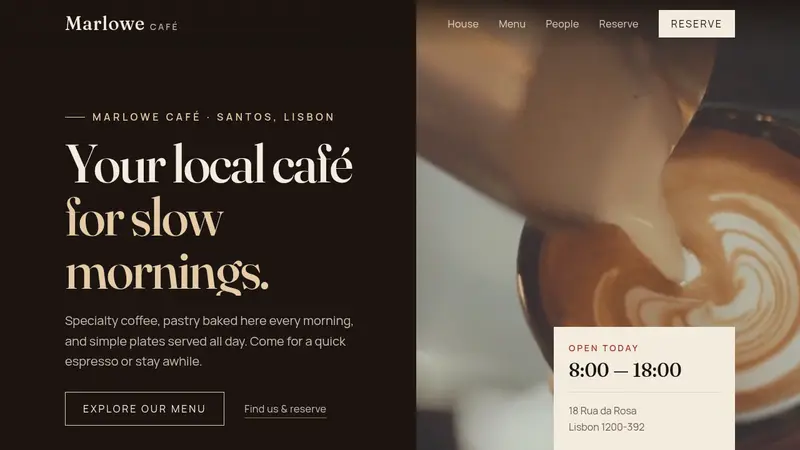
Present coffee, pastry, and kitchen items with photographs, categories, descriptions, and prices. Each card opens into a detailed view that stays easy to use on a phone.
Use the video hero, moving house notes, quick facts, layered photographs, and a short visit guide to show how the cafe looks, feels, and works.
Add portraits, roles, and short biographies for the team, then reinforce the story with guest notes from regulars and practical answers in the FAQ.
Keep the address, phone number, opening hours, reservation choices, and message field together. Guests can ask for a window table, plan a group visit, enquire about a private evening, or mention a menu item.
Click “Use this template” to add the cafe website to your workspace. The responsive layout, animated sections, visual menu, team profiles, FAQ, hours, and reservation form are already prepared.
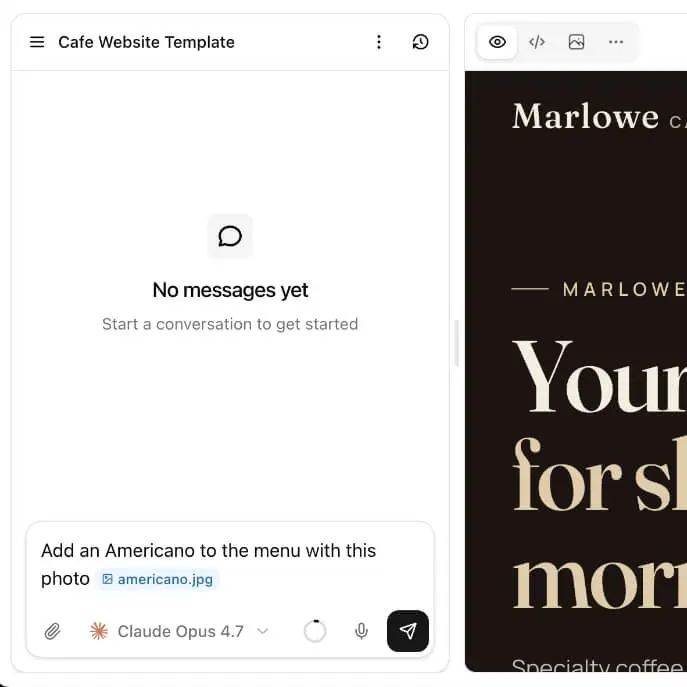
Replace the name, video, photographs, menu items, prices, and copy with your own. Use the AI editor to tell the cafe’s story, introduce the team, update the visit guide, and add the correct address, phone number, and hours.
Publish the finished cafe website with one click and connect your own domain when you are ready. Use it as your cafe’s website for sharing the menu, opening hours, contact details, and reservation information online.
01
The opening section places the headline, introduction, and two calls to action beside a cafe video on desktop, with the video moving above the copy on smaller screens. Today’s hours and the address appear in a compact visit card, followed by a moving highlights strip and four cafe statistics.
02
Menu items are arranged in a responsive card grid. Each card shows a photograph, category, name, short description, and price. Selecting an item opens a larger view with the full description and a link to the reservation section.
03
The house section combines a short story with two layered photographs that reveal as the visitor scrolls. Below it, three numbered columns explain arriving without a reservation, ordering at the counter, and the cafe’s approach to longer stays.
04
Three team profiles present the people behind the counter with portraits, roles, and short biographies. Guest quotes and an expandable FAQ follow. The final section places the address, phone number, and weekly hours beside a reservation form with options for tables, groups, private evenings, and menu questions.
What is included, what you can customize, and how the menu, reservation form, publishing, and pricing work.
The template includes a video hero, moving house highlights, cafe statistics, an image-led menu with detail modals, an animated story section, a three-step visit guide, team profiles, guest notes, an expandable FAQ, complete contact details, weekly hours, and a reservation inquiry form.
Yes. You can replace every sample drink, pastry, and plate with your own items, including the category, name, short summary, full description, price, and photograph shown in the detail view.
Yes. Use the AI editor to change the name, text, colors, video, photographs, menu, people, guest notes, FAQs, reservation choices, and contact details. If you are choosing brand colors first, start with the color palette generator.
Yes. The template starts as a complete one-page website, and you can add separate pages for a larger menu, events, private hire, catering, multiple locations, or anything else the cafe needs.
Yes. The included form collects a name, phone number or email, the reason for the inquiry, and a note. Its sample choices cover a window table, a group, a private evening, and individual menu items, and you can replace them with your own options.
Yes. Once the cafe website is ready, you can publish it, connect your own domain, and use that address across Google, social profiles, menus, and printed material.
No. You can customize the cafe website with the AI editor without writing code. If you want full control later, you can also download the source code and continue editing it yourself. The same path is how we build a small business website.
You can replace the main brand details, menu, photographs, hours, and contact information and publish a complete cafe website in around 30 minutes. More extensive changes to the content or structure may take longer.
Do you have more questions? Contact us
Get started today
Replace name with your cafe, add your menu, people, photographs, and hours, then connect the reservation form to the inbox you already use.